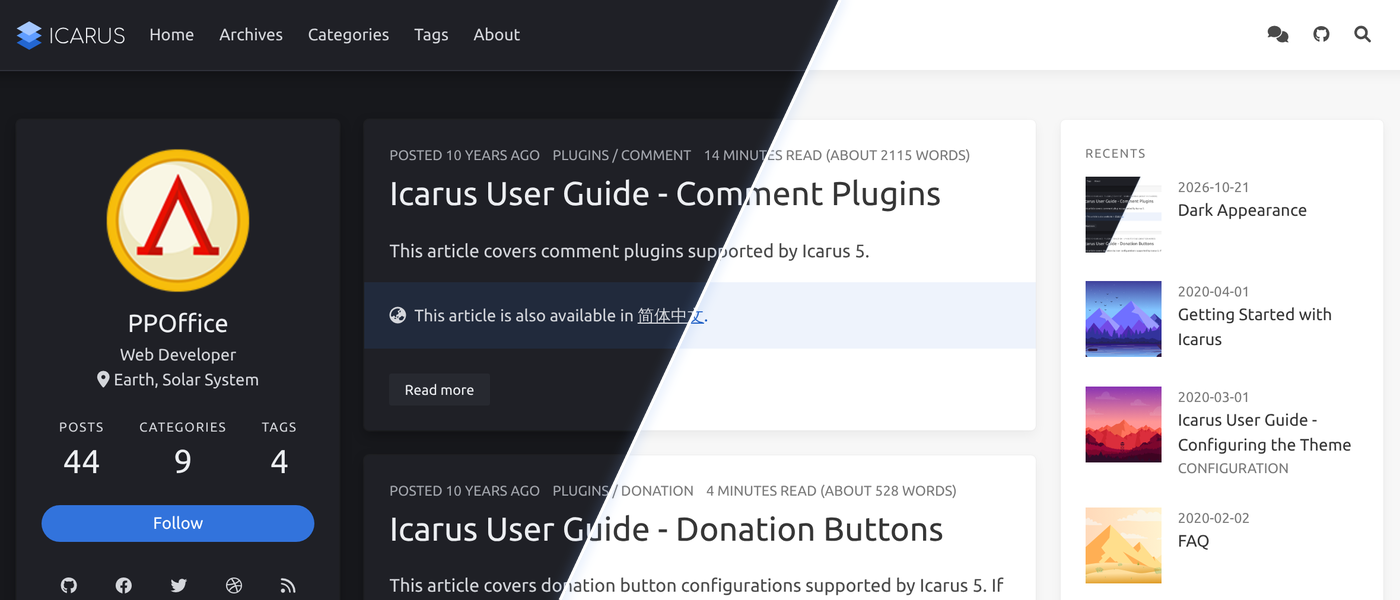
Dark Appearance
The default variant of Icarus can now be dark, either all the time or only when the browser or operating
system of your visitors asks for a dark color scheme.
This has long been requested by the community
(#1108).
The dark colors live in the same stylesheet as the light ones and are picked by CSS alone, so there is no
extra request, no JavaScript involved, and no flash of light colors when a page loads.
This post itself is always displayed with the dark appearance, while the rest of this site uses appearance: auto
and follows the color scheme of your system.
Enabling the Dark Appearance
The appearance is controlled by the new appearance setting, which accepts three values:
light(the default): the light look Icarus has always had.auto: light or dark, following the color scheme setting of each visitor’s browser or operating system (theprefers-color-schememedia query).dark: always dark.
To follow the setting of your visitors, open _config.icarus.yml and add the following line
(or change it, if your configuration file already has appearance: light):
1 | variant: default |
To make your site dark for everyone, use dark instead:
1 | variant: default |
Form controls and scrollbars drawn by the browser follow the appearance as well.
The Cyberpunk variant, which is already dark, ignores this setting, as well as the dark_theme setting
described below, and always shows the dark logo set in logo_dark.
Per-Layout and Per-Page Appearance
Like most other theme settings, appearance can be overridden in the layout configuration files
(_config.post.yml and _config.page.yml) and in the front-matter of a post or page.
For example, to make all posts dark while keeping the index and other pages light:
1 | appearance: dark |
Or, to make a single post dark:
1 | title: A Post at Night |
This is exactly how this post is made dark.
Code Highlight Theme
When a page is dark, code blocks use the dark_theme setting in the article > highlight section,
which defaults to atom-one-dark.
With auto, both themes are loaded and the browser picks the one matching the color scheme of the visitor.
You can find other dark themes of highlight.js 11.11.1, the version that Icarus uses,
here.
Copy the file name, excluding the .css extension, and put it in the dark_theme setting.
Themes in the base16 folder need the folder name as well, such as base16/dracula.
For example, to use github-dark:
1 | article: |
Logo
The logo shipped with Icarus has a dark version with a light wordmark, which is used automatically on dark
pages as long as logo is left as /img/logo.svg.
If you use your own logo image, provide a version for dark backgrounds with logo_dark; otherwise, your logo
is shown as it is on dark pages.
Text logos need nothing.
1 | logo: /img/my-logo.svg |
Customizing the Colors
The dark colors are Stylus variables, such as $dark-background, $dark-surface, $dark-text, and
$dark-link, listed at the top of <icarus_directory>/include/style/dark.styl.
They are declared with ?=, so you can either change them there or define your own values at the top of
<icarus_directory>/source/css/default.styl, before the stylesheets are imported:
1 | + $dark-background = #0d1117 |
Pages with the auto or dark appearance also have a data-appearance="auto" or data-appearance="dark"
attribute on the <html> element (light pages have none), which your own styles can target.
Remember that auto pages are only dark inside the prefers-color-scheme: dark media query:
1 | html[data-appearance="dark"] .content img { |
Limitations
- The Giscus, utterances, Beaudar, Waline, Artalk, and Cusdis comment plugins follow the appearance of the page,
unless you set their own theme or dark mode settings.
Giscus, utterances, and Beaudar pick their colors when the comments are loaded, so on
autopages they do not switch until the page is reloaded if the color scheme of the visitor changes meanwhile. - Other comment plugins, and other content from third-party services, such as the Google Custom Search, Baidu, and Algolia search widgets, and share buttons, keep their own (usually light) look.
- Images are not inverted or dimmed.
- Browsers that do not support the
:where()CSS selector display the light appearance, and those that do not support theprefers-color-schememedia query displayautopages in light.